Jo.Nu har jag filmat in en film i fraps Som är typ 1 minut ( 1.00 Gb )
Men den har inget ljud.Hur kan jag Filma in LJUDET i spel också?
Snälla svara.Vill filma in buggen i spelet med ljud.

Jo.Nu har jag filmat in en film i fraps Som är typ 1 minut ( 1.00 Gb )
Men den har inget ljud.Hur kan jag Filma in LJUDET i spel också?
Snälla svara.Vill filma in buggen i spelet med ljud.
Så här ser det ut för mig och det funkar bra:
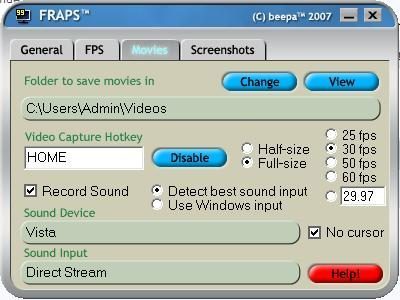
↗ till inläggetHur kan jag byta "Sound Device" och "Sound Input" Grejset?Så här ser det ut för mig och det funkar bra:
Från fraps hjäpfil:
How can I adjust the volume of the sound that is recorded?
You must configure the volume through the "Sounds and Audio Devices" item in the Control Panel. Use the following steps:
# Click on the Control Panel and select Sounds And Audio.
# Click on the Audio tab.
# Find the Sound Recording device and click Volume.
# Adjust the volume for the Input that Fraps is recording from. This is usually named "What U Hear", "Record Master", or "Stereo Mixer".
If you can't see the correct Input on screen you may need to enable it by clicking on Properties in the menu and ensuring all Inputs have a check beside their name.
↗ till inläggetOkej.Eftersom jag har en Buggat mic så funkar inte det dära.Men tack ändå:ska be min pappa att fixa en riktig mic :PFrån fraps hjäpfil:
How can I adjust the volume of the sound that is recorded?
You must configure the volume through the "Sounds and Audio Devices" item in the Control Panel. Use the following steps:
# Click on the Control Panel and select Sounds And Audio.
# Click on the Audio tab.
# Find the Sound Recording device and click Volume.
# Adjust the volume for the Input that Fraps is recording from. This is usually named "What U Hear", "Record Master", or "Stereo Mixer".
If you can't see the correct Input on screen you may need to enable it by clicking on Properties in the menu and ensuring all Inputs have a check beside their name.
Vill du vara med i diskussionen?
Bli medlem Logga in